Showing posts with label paperless classroom. Show all posts

Sunday, January 27, 2013

Key to a Paperless Classroom, the Skitch APP


Skitch is a remarkable app that allows students to annotate over images.  I am currently working daily with Bree Campbell , @breeanneshay, at Bellevue East to implement iPads in her English classroom.  We used Skitch in the classroom to it’s fullest potential in our effort to create a paperless classroom and a learning environment that is ubiquitous, not device dependent.
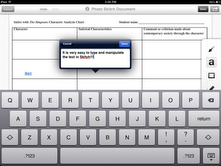
One of the challenges we faced this week was taking a character analysis chart and and transforming it into the digital, cloud-based world so students can interact with the content anywhere. Since the chart contained a table, Google Docs mobile was out, because the table feature is not available yet on the iPad.  We brainstormed several alternatives including Pages, Notability, and Doceri, but settled on Skitch since it allowed students to type on the image, size it easily, save to a camera roll, and can be uploaded to Google Drive.


Step 1:  Getting the image to Skitch

First we tried to take a picture of the paper and import it into Skitch. The quality was of the image ok, but we weren’t quite satisfied.  There had to be an even better solution.  And we found it!

On the computer, I copied the chart from Word (edità Select All-> Copy)  to a PowerPoint slide (New Slide à Paste) and saved the slide as an image, a JPEG. 

To Save a PowerPoint Slide as an image do the following:

      1.     File -->  Save As

       2.    Click the Arrow and select   JPEG from the choices listed.
3.  Voila! A crystal clear chart and NO PAPER!

Note: Remember where you save the image. I like to save to my desktop. 


Then, we e-mailed the image to all the students to save in their camera roll.

Photo taken of the chart.
Chart saved as a JPEG from PPT


Step 2: Editing and Saving the Image

The kids saved the image into their camera roll on the iPad, then opened Skitch, and imported the image.  Each student added information to the chart daily and saved the image to the camera roll at the end of the class period. 

The classroom workflow for the week was, students open Skitch, import their edited image from the previous day, and keep adding content.  On Friday, students saved it to the camera roll and e-mailed the completed chart to us for grading.  

Camera Roll = Save; E-mail = Hand In


Here is a sample of the completed chart:


 Now on to paperless grading!

Written by Ann Feldmann
@techiefeldie


Wednesday, January 23, 2013

Recipe for Successful Classroom Collaboration

How many students participate in a class discussion?  A handful? Five to ten?  Answers vary depending on the class, time, and topic, but to get all students to have a voice is every teacher's’ challenge.

Today, all 26 students in Jeff Bernadt’s (@jbernadt) history class thoughtfully participated in a class discussion using their iPads and a back channel at http://todaysmeet.com.  

Students were given a choice of 12 different articles to read about the Holocaust from the American perspective and the following writing prompt on the back channel at TodaysMeet.com:
“What are your thoughts after reading about the Holocaust from the American perspective? Reference information from readings in your post.”

Students began to read with a purpose, the room fell silent, and the conversation lit up online.  Students purposefully posted comments to the back channel using their iPads and shared facts, feelings, and questions based upon the article(s) they read.  Mr. Bernadt, spent his time reading and responding to students throughout the activity.

The class period zipped by at 4G speed! Before we knew it, we had 19 pages of discussion and the class period was nearly over. 


“We had a great little discussion,” Bernadt said to conclude the class.  “I am hearing lots of voices today.  In a traditional class discussion, there are always just a few that have a voice. Here it gives all of you an opportunity to have a voice and listen to alot of view points very quickly.”


Written by Ann Feldmann
@annfeldmann1

Monday, October 15, 2012

A Paperless Paper Entry 3


"You came back!" said a bright eyed 4th grader as I was walking down the hall to my iPad group. Yes, I came back! How could I stay away? These guys were sharing out Dropbox folders to their teacher today. On this day we let the students get more familiar with dropbox, while we pulled students in small groups to learn how to not only log into their dropbox accounts but also their gmail accounts. 


This step is key in making sure each student remembers his or her student logins and passwords. We made sure that usernames and logins were the same for both accounts in order to avoid confusion. We also put the account names and password on a google doc and shared it between myself and @gtwitsims.


Here is what excited me the most about today's experience... Kids were writing right away using Notability. Worried about what they were to write, one student asked, "What's the topic of our paper?".

"Anything you want!" I replied back to him. 
With a huge smile he continued writing. These kids were ready to begin exporting their first paragraphs to Dropbox before I even got everyone finished with their sharing task. How great! This is going to be fun!

Written by: Jenny Krzystowczyk
@jennykbps