Wednesday, October 30, 2013

Pages and Google: When Two Great Apps Come Together

Our teachers today have been learning the ins and outs of Pages during Apple Foundations Training.  After a morning of creation time, they were ready to share with parents, students, and other teachers!  

Our roadblock? Our end users are not Pages users and we want to be able have the file accessible to link and share.  Combining Pages and Google together is the powerful combo we need that creates an elegant workflow for our district.   We are a GAFE so all teachers and students 4th grade and older have access to Google Apps.  The share capability of Google Drive is an easy way to make the file accessible to everyone.   

The Pages Google Workflow looks like this:

Export - Upload - Share 
  1. Create and save the document in Pages.
  2. Click on  File ---> Export. Choose PDF.
  3. Open up a browser window and login to Google Drive.
  4. Upload the PDF to Google Drive.
  5. Click Share. Change the share settings to Public.
  6. Google generates a link to the file.  You can share this link in so many ways:  Google + , Twitter, link up on a web site, e-mail it to parents, and so on!

*Note: If you update your Pages file, you will need to export the PDF again and then upload it to Google Drive too.  Lessons learned - proof your document well before you export to PDF, upload to Drive, and Share with the world!

Written by Ann Feldmann
@annfeldmann1


Monday, October 28, 2013

Three Easy Ways to Use 1 iPad in the Classroom

Have an iPad and wonder how to use it in your classroom?   Here are three easy ways to get you started using that one Pad to impact teaching and learning.

Idea #1:  Team Teach With Yourself
 
1. Use an app such as Explain Everything to create a screencast to use with your students. Upload the video to Youtube and play it for your students! They will love it and you will to! The best part is you can rewind it and play it again and even better, you can add it to a website, blog, or e-mail and share it with your students to view again. What a perfect way to review for a test!

Idea #2: Involve Students

1.  Pose a question, pass the iPad and let a student draw or write a response.
2.  Use an app such as Explain Everything and have students create a group reflection on a classroom learning experience. Create a slide per student or group and let them illustrate and record a narration.  
3.  Use an app such as Notability and a reading selection. Let students pass the iPad and highlight vivid verbs, topic sentences, adjectives, etc.  

Idea #3:  Lead the Learning Every Day
1. Create an iTunes U course on your computer.  Load all the material for a lesson to your iTunes U course (material section). You can upload  images, websites, keynotes, PDF’s, videos, etc.  Then, pull the material up on the iPad and use your iPad for instruction.
2. Use an app such as Haiku Deck to create a visual presentation. Pop the preso up via Apple TV, Reflector or Air Parrot and walk around the room as you present!  Just moving around the room is transformational.  

What ideas do you have to transform teaching and learning with just one iPad?  Please leave me a comment.

Written by Ann Feldmann
@annfeldmann1

Friday, October 18, 2013

Is iMovie Really Just a Movie?


One of our most beloved apps on the iPad is Apple’s own iMovie.  And guess what?  Our students love it too!  In fact, we use it with all grade levels.  Sometimes I think people have a misunderstanding of the educational value of iMovie.  Yes, it can be used to create a video of a recent trip, a birthday party, or any celebration, but one of my favorite ways to use it in the classroom is the iMovie trailer feature.   


iMovie trailers have great features that demand thoughtful planning by its producer(s).  It encourages collaboration, planning of video shots, and catchy storytelling.  To make a good iMovie trailer, basic writing conventions, and narrative writing skills must be used.  Furthermore, analysis of content, organization of materials and ideas, and editing skills are used throughout the project.  Students feel empowered by the outcome of their projects and shine in the process of creating a trailer.  


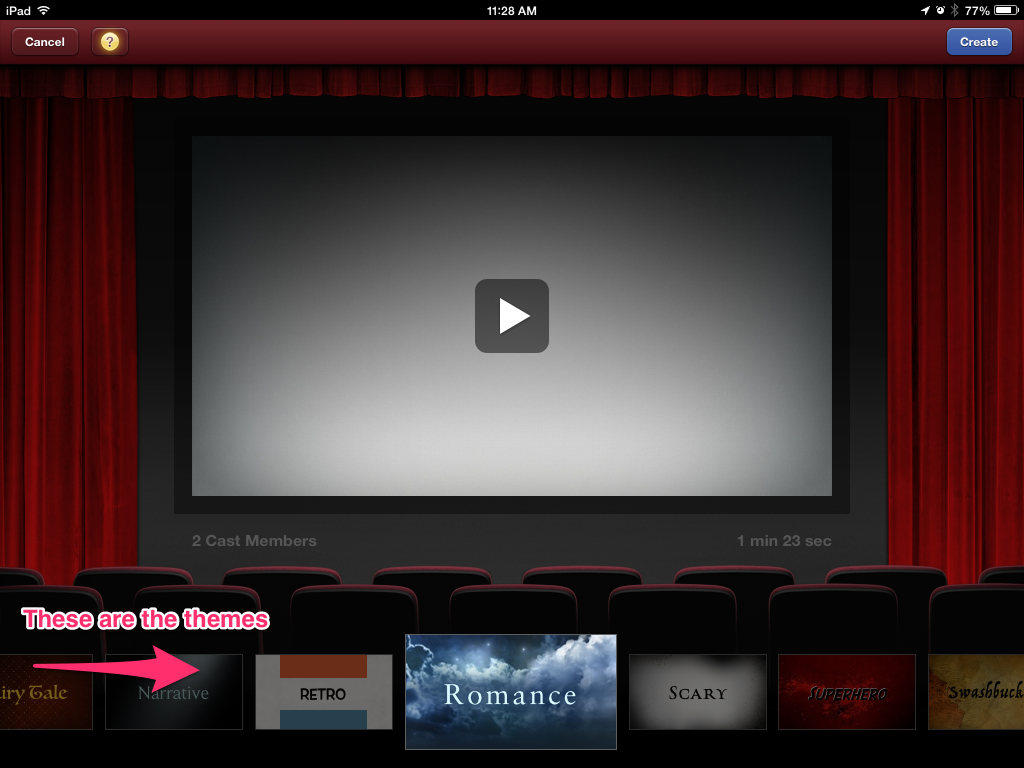
iMovie gives kids choices of themes to use and they always look professional and impressive when they are done.  
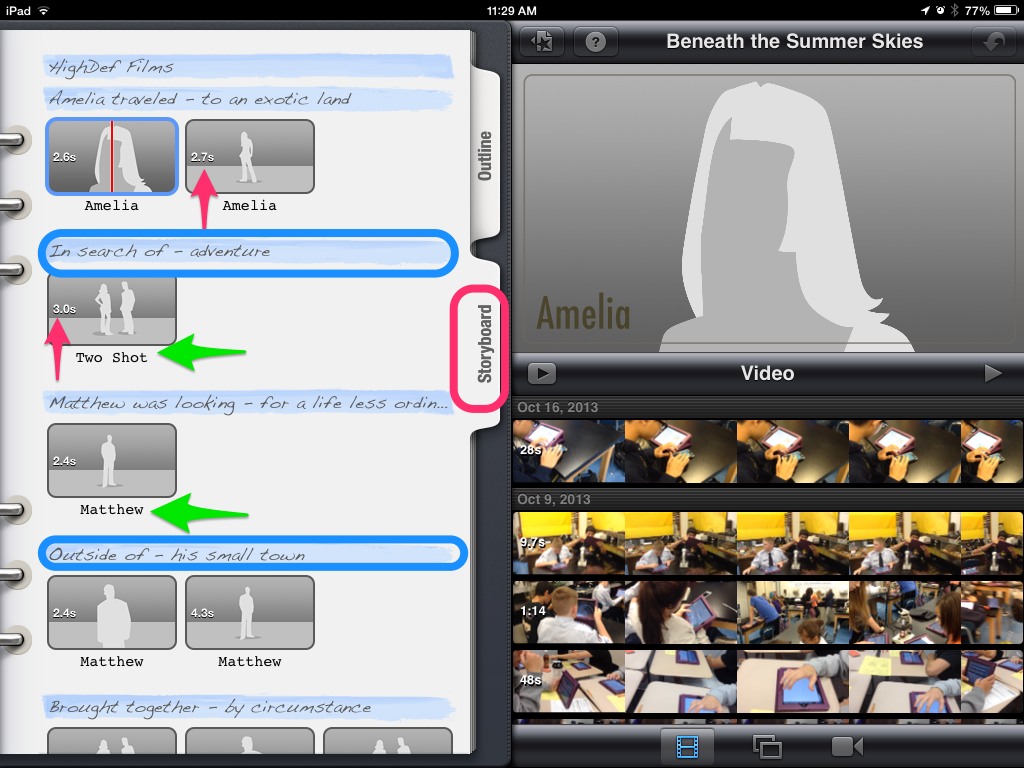
Creating a good iMovie trailer demands that students are thoughtful about the video material they record.  For example, some shots need to be in a wide landscape mode.  Other video shots need to have two people in it to be most effective.  The storyboard below dictates what kinds of shots and how long the shots need to be for their best movie trailer.  I also like the catchy openers identified in blue below.  These phrases can be edited to go with the story.  Here is a pdf iMovie trailer planner you can use before opening up the app.  


Sharing these trailers is easy to do as well because they are often no more than a minute and a half. Students can upload their movie trailers directly to YouTube or house them in their iTunes Library.  Using a gallery walk method with headphones and splitters are a great way to share the trailers your students made.  In this model, place the iPads around your room, preferably at tables, and plug in headphone splitters so that more than one person can listen to the video at a time.  Students love watching the videos together.  Compare this to our traditional Power Point Presentations some of us have had our kids create in the past.  We had to make time to present these.  This process can sometimes take up an entire week.  Using the Gallery Walk method is quick, easy, and engaging for everyone.  

If my enthusiasm for iMovie trailers isn’t convincing enough for you, how about we tie it to a couple of common core standard for insurance?  iMovie matches up to several of them, but I pulled a couple out for the post.  

CCSS.ELA-Literacy.CCRA.SL.2 Integrate and evaluate information presented in diverse media and formats, including visually, quantitatively, and orally.
CCSS.ELA-Literacy.CCRA.SL.5 Make strategic use of digital media and visual displays of data to express information and enhance understanding of presentations.

New technologies have broadened and expanded the role that speaking and listening play in acquiring and sharing knowledge and have tightened their link to other forms of communication. Digital texts confront students with the potential for continually updated content and dynamically changing combinations of words, graphics, images, hyperlinks, and embedded video and audio. From www.corestandards.org

Using the app iMovie gives students a creative platform in which to communicate ideas, analyze materials, collaborate, and edit written work.  Goodbye Power Points, hello amazing trailers and happy students!  

Written by Jennifer Krzystowczyk

                                       @jennykbps

Wednesday, October 9, 2013

The Power of Time + Collaboration : Keys to a Successful iPad Roll-Out

In light of recent events in Los Angeles Public School District and their total recall of iPads due to lack of planning and training, I had a feeling of validation for our program in rolling out iPads within our Bellevue Public School District.  Our team has thought so carefully how to bring iPads to our classrooms from training, coaching, and hardware management.   All of our hard work is starting to pay off.  One of the most important elements of our success is the time and collaboration we are able to provide to for teachers.
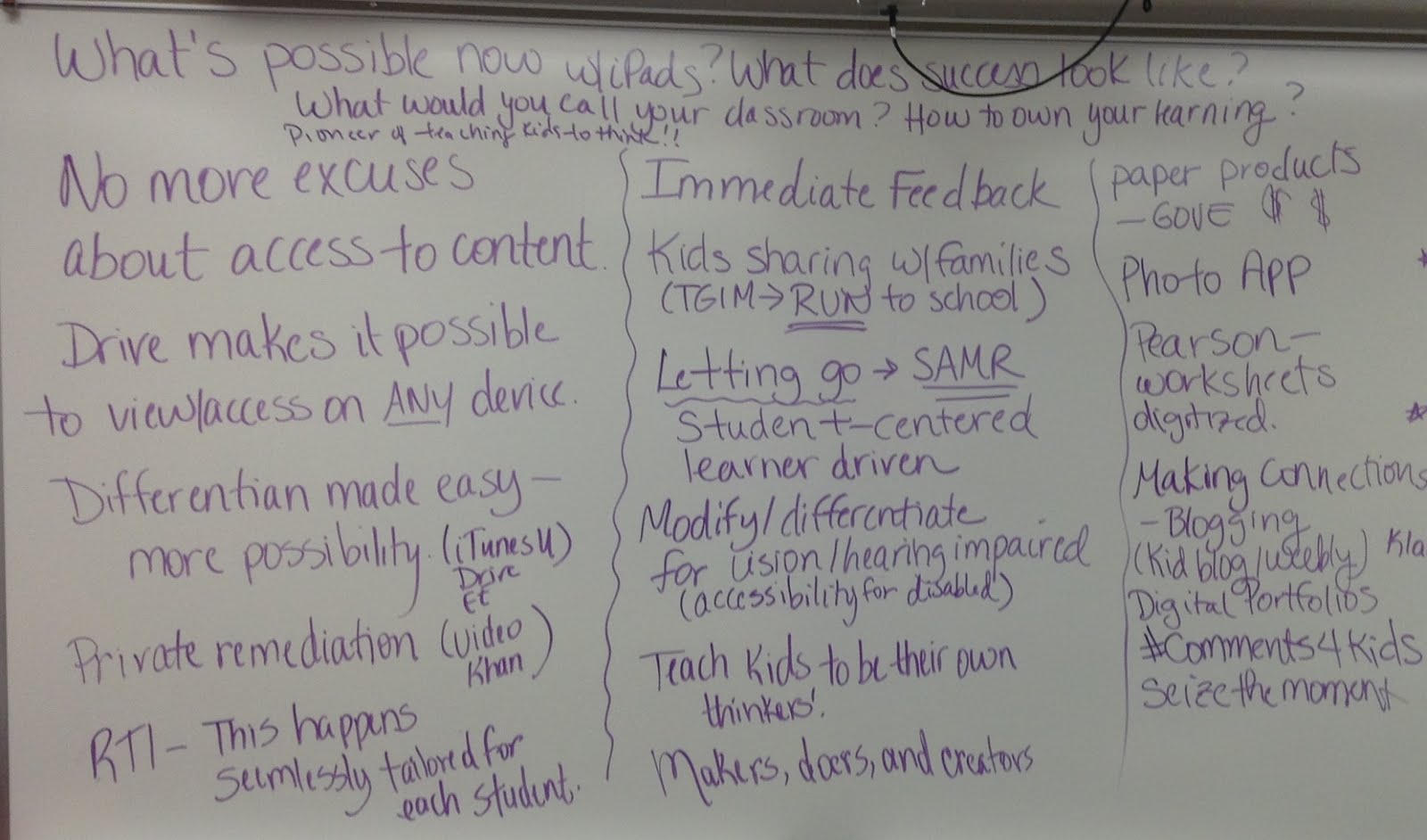
During a recent day of collaboration with our teachers, many amazing ideas were formed, problems were solved, and creative juices were flowing.  Here are some of the highlights of our discussions together.


  • Students no longer have excuses.  Because most of our teachers utilize the Google Drive app for workflow- students have 24/7 access to assignments.  All of their work is in one place whether they are at school, traveling, or at home.  
  • iTunesU allows teachers to house all of their resources for units and classes.  It gives iBooks Author products a place to “live” and be shared to their students.  And for take home models, iTunes U allows students to work offline as long as they have already downloaded their materials.
  • Differentiation happens on the fly for students as needed.  One classroom could have students working on different levels but still on the same objective.  This is an amazing option for teachers having to implement RTI.  Being able to use Kahn academy videos in class for remediation is instant differentiation for students who might be struggling.  
  • Students begin to take ownership for their own learning due to increased student choices for production.  Whether students want to create a Haiku Deck presentation, an iMovie, or a flyer in Pages, they start becoming more vested in their own learning.  As the model of “sit and get’ changes to “decide and engage” passion for learning increases.  
  • More and more teachers are seeing that 100% of their students are engaged in their classroom.  That in itself is transformational!
  • The iPads allow learning to happen in a more organic and fluid manner.  Our teachers are discovering that the bulleted and scripted lesson plans of the past don’t quite fit into a classroom of iPads.  Changing direction during a lesson happens often due to the availability of instant information and the opportunity to dig deeper into a topic.
There are many more empowering conversations and outcomes from our day together, but I will save those for another date.  It is just so powerful to get all of these teachers together.  


Our training room was totally differentiated!  We had people creating iTunes U courses, some mastering curriculum apps, and others creating Google Forms and organizing their Google Drive.  It was a student driven classroom, and a great model of what a transformed classroom could look like.  
But most importantly, these teachers had the gift of time and the ability to work with others.  Time and collaboration.  Two critical elements that cannot be underestimated in the plan to implement any new incentive- iPads or not.  


These teachers are our trail-blazers!  They are forging ahead, meeting their students where they are, and advancing students’ skills ensuring they are prepared for the 21st century.  
*Notes from our opening conversation.  

Written and Published by Jenny Krzystowczyk
@jennykbps

Friday, September 13, 2013

Six Things We Know About iPads in the Classroom


The school year is off to a great start and we as trainers are deep in the trenches with our iPad Academy Participants.  After last year’s experience it felt great knowing what was ahead of us as trainers.  It was also nice that our apps, Apple Configurator and iTunes have improved with updates. Our comfort level is such that nothing really throws us off course anymore.    


Here are six things we know for sure will happen with iPads in our schools….


Reflection
Reflection becomes a key piece of this experience.  Being able to look back, analyze, and rethink how something was done only brings us closer to being effective digital teachers.  Some of our tools for reflections are the Google+ community and Hangouts, Twitter using the #ipadacademy, Google Hangouts, and group meetings.  As educators we understand the importance of reflection, however as the years pass and we master our routines, this skill is often overlooked.  As a trainer, I get to push teachers to reflect, discuss, and rethink instruction.  It is amazing to watch their teaching change as a result of quality reflection time.  


Pace
Helping our teachers realize that the pace of their instruction must slow down while the iPads are being introduced.  One teacher stated this week, “OK. I know I tried to do too much.”  This after introducing the iPads and also trying to accomplish curriculum goals all in 45 minutes.  It just isn’t possible. Once the students know how to get around the device and utilize specific apps, then the curriculum pace can increase.  But not until then.


Obstacles
We know now that there will be moments of rethinking processes and overcoming the inevitable obstacles that will arise.  Obstacles like blocked websites that need to be opened, Apps that have updates that force some relearning,  and lacking enough time to accomplish teacher goals will always be present.  However, we now have processes in place to deal with these; maybe not the lack of time issue, but that is always the case with creative teachers in a 24 hour day.  


Change
One thing is for sure; the teachers that we get to work with evolve in a way the others do not.  The use of an iPad on a daily basis changes the way students interact with each other, their teacher, and their content.  In this supportive environment, teachers are able to try new ways of teaching old content.  Differentiation becomes easier with the iPad.  Teachers actually state that they have more free time once the paperless workflow is mastered.  The delivery of information often goes through the Google Drive App.  Workflow becomes paperless with immediate feedback through Drive, Socrative and other web based applications.  


Creativity
Students have access to a variety of apps that allow for creativity.  Showing what students know through Explain Everything, iMovie, and Keynote give students flexibility to demonstrate their knowledge instead of a multiple choice paper and pencil test.  Students begin to own their learning through the creative process on the iPad.  They are proud of their work and eager to share their products.  


Collaboration
Collaboration for both teachers and students increase as a result of our iPad Academy.  Teachers collaborate together on ideas, problem solving, and support.  It is scary trying new things and knowing they have each other is a huge help!  Students begin collaborating more often because now the tasks have changed to creating videos, multimedia projects, and Google docs.  I believe we are better together and this experience often proves my point.


While it is still early in our school year, I can’t wait to watch all of these things happen as I know they will.  And for all you edtech trainers out there- way to be there for your people!


Written by:  Jenny Krzystowczyk  @jennykbps

Monday, August 26, 2013

GOING GOOGLE... How Long Does it Take to Change A Culture?

As many of you know, our district went Google two years ago.  It was a monumental leap of faith by our Superintendent to trust our judgement and go for it.  Our vision was this:  less printing, more sharing and collaborating, and increased production for both teachers and students.  We are on year three now, and I think we are starting to see a change in the weather. It has taken a long time to convince teachers to use google Docs and Google Calendar, but I am beginning to see the rainbow at the end of the storm!  


Many days I have felt like a salesperson for Google, walking around saying things like “Oh, did you know you could do that in Google?” or “Let’s load that to Google and then share the link.”  I've got
used to the stares and weird looks, because in the end I knew it was the best workflow for everyone! Now I love learning from some of our experts in the schools- the students!


Just today, as I was coaching a teacher in how to utilize Google Docs with his students I saw a student doing a math outline on a doc.  She was using superscripts to write equations!  It was great! Her teacher is one that we haven’t even worked with.  How exciting to know she was using Google Docs with her students all on her own.  That is the kind of things I love seeing these days.  

I know it isn’t everywhere in our district, but it is happening more and more.  See below for some hard data.   


Change is slow, but it is happening.  I know the students appreciate their tech savvy teachers, and I know the teachers love the no-excuses available philosophy of Google Docs.  Going paperless is one advantage, but the real advantages are increased collaboration, efficient use of time, and immediate feedback.  Keep dockin’ and rockin’ Bellevue!  True change is just over the rainbow!  It was Socrates that said the following:


Written By:  Jennifer Krzystowczyk
@jennykbps


Wednesday, August 21, 2013

Let's Run to School


As I listened to @angelameirs keynote at #ettipad in Atlanta this spring, I related to many things she said.  At one point, she made a point of saying, “don’t you wish school was a place that kids want to run to?” and then she popped a photo of her young kids beaming faces on the first day of elementary school and contrasted that with them on the first day of high school.  As a mother of four of my own kiddos, I can relate!  I want each of them to run and skip to school and come home so enthralled with that they learn that they self start and keep learning.  Students enthusiasm for school seems to decrease as their age increases.  It begs the questions, how can we create a school where kids want to get up and run to it each day?

Creating a student centered learning environments is the key.  Twitter was my go to place this summer to learn more about personalizing and individualizing instruction from experts around the world. I learned more about the flipped classrooms, student centered classrooms, project based learning, authentic assessment, and genius hour.  Thanks to my PLN, I joined a MOOC, read Teach Like a Pirate , and found the #tlap chats on Monday nights where I lurked as I sat at baseball games!  

What did I learn?  

Three things:

1.  Kids need to be able to use tools from this century to explore, create, collaborate, and learn course objectives in the order they wish when they wish (asynchronously) .  
2.  Teachers need to be able to individualize instruction and create a classroom environment to make this happen. Often this means letting go and allowing students to take the lead.
3.  Time, revision, choice, trust, and collaboration are essential to student centered classrooms.

Creating this environment. iPads are the tool that can make this happen!  We can provide students their own individualized learning plans (IEPS’s) and let them choose how they learn, what they learn, and when they learn.   Teachers are the key to crafting the learning environment, conferencing with students, providing students the content to interact with, enabling them to teach others, share what they learn, and as a result, teach them to love to learn.

This means teaching and learning looks different.  

Instead of this….
Transformed to this...
lecture
teacher curates content and pushes it out to the iPads via  ITunes U courses and iBooks
teacher in front of the room
teacher conferencing with students individually on creating artifacts that support their learning on the iPad while others are working independently
grading papers during plan time
assessing projects together, providing critical feedback, providing time for revision, and publishing to the web
failure is frowned upon
failure is the springboard to growth and risk taking is embraced
students in desks, sitting most of the period
students choose to learn where they will learn best, movement is encouraged
a few students share
a connected classroom where all students are have voice with back channels, collaborative docs, and connections to the world
covering objectives sequentially
freedom to work on any objective and move through the curriculum asynchronously
the teacher is the fountain of knowledge and main person delivering information
reciprocal teaching a regular occurrence; teachers teaching students, students teaching students, and students teaching teachers.  
working with classmates physically in the classroom
working with classmates virtually around the world; sharing and creating projects that are web worthy with others who may or may not be in the physical classroom
course work created for a teacher to assess
course work created, revised, discussed, revised again and published to the web
teacher centered
learner centered


Written by Ann Feldmann

@annfeldmann1